
Optimizing a WordPress website has always been a matter of installing a few plugins to solve the problem. The optimization I did on the virtual host was very limited (I couldn't install Redis and similar solutions). Currently, the website performs well in browser tests.
This article will be continuously updated, and the content introduced in this article is free (or free is sufficient).
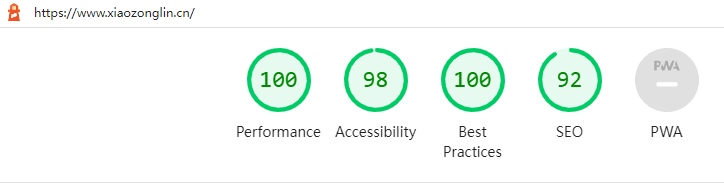 Test Results
Website Optimization for Speed#
HTTP2 push content plugin can help you easily apply HTTP2. It will automatically push the js and css files contained in the page using server push. Regarding server push, "HTTP/2 Server Push Tutorial" provides an explanation of this technology that can reduce the number of requests (basically, it solves the problem quickly and effectively with one or two requests). In addition, Upyun also supports setting up HTTP2+server push, but there are some limitations.
Redis Object Cache plugin can cache data such as comments using the Redis database, speeding up the website while improving its concurrency. WP OPcache plugin can accelerate PHP scripts. These two plugins require the installation of corresponding applications or extensions on the server, which is not possible with a virtual host.
On the CDN side, try to set a longer cache expiration time for static files such as js, css, and audio. Upyun also has page compression, and setting the compression level to 1 is sufficient. Setting it too high will affect the speed.
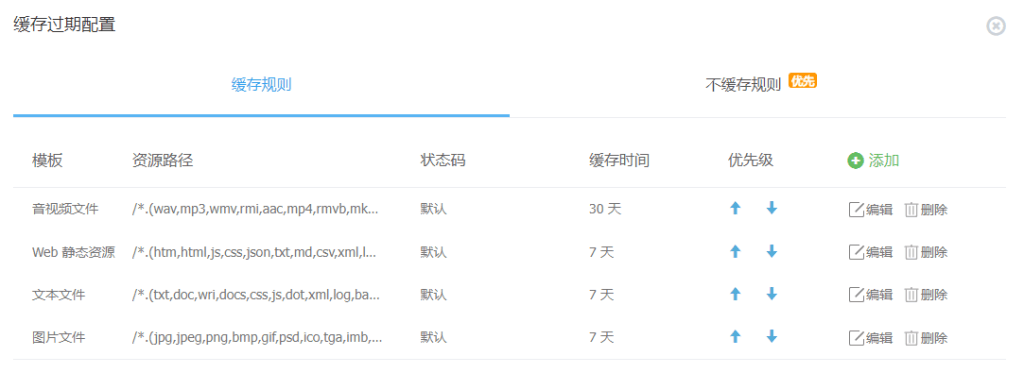

In addition, Upyun also supports HTTP3, which is recommended. (However, this does not have a significant impact on website loading speed.)
Website Optimization for Security#
Although this thing is futile for people who really want to attack, as webmasters, we cannot leave the door wide open for others to enter.
Regarding the server, Teacher Du helped me install the Weibu Trojan detection on my server, and I set the security risk of the panel to 0.

Regarding applications, I have enabled automatic updates for all plugins used on the website, and the WordPress version will always be kept up to date. The website uses the Wordfence Security plugin as an application firewall and modified the php.ini file according to the instructions provided by the plugin.
Recently, the situation of brute force attacks has become severe. According to the data provided by Wordfence, most attackers choose to use "admin" as the username for brute force attacks, and some use my domain name, English names, or usernames starting with "test" for attempts. The number of brute force attempts this month is 187, and the number of various attacks is 1116. Currently, Two-Factor Authentication is being used to strengthen login security, so even if the password is discovered, unauthorized access to the backend is not possible.
Regarding DNS resolution, this site uses Tencent Cloud for domain registration and uses Cloudflare for domain resolution, with DNSSec enabled. (It seems that DNSSec is not very useful, just trying it out). I heard that Cloudflare's resolution in China has some problems, so I switched to using Yundun as the authoritative resolution service.